> ## Documentation Index
> Fetch the complete documentation index at: https://gofastmcp.com/llms.txt
> Use this file to discover all available pages before exploring further.
# Quickstart
> Build your first FastMCP app in under a minute.
export const PrefabDemoFrame = ({demo, height, title}) => {
const [blobUrl, setBlobUrl] = React.useState(null);
React.useEffect(() => {
let active = true;
let objectUrl = null;
let payloadsPromise = window.__FASTMCP_PREFAB_DEMOS_PROMISE__;
if (window.__FASTMCP_PREFAB_DEMOS__) {
payloadsPromise = Promise.resolve(window.__FASTMCP_PREFAB_DEMOS__);
} else if (!payloadsPromise) {
payloadsPromise = new Promise((resolve, reject) => {
const script = document.createElement("script");
script.src = "/prefab-demo-payloads.js";
script.onload = () => resolve(window.__FASTMCP_PREFAB_DEMOS__);
script.onerror = reject;
document.head.appendChild(script);
});
window.__FASTMCP_PREFAB_DEMOS_PROMISE__ = payloadsPromise;
}
payloadsPromise.then(payloads => {
const html = payloads[demo];
if (!html) {
throw new Error(`Unknown Prefab demo: ${demo}`);
}
objectUrl = URL.createObjectURL(new Blob([html], {
type: "text/html"
}));
if (active) {
setBlobUrl(objectUrl);
} else {
URL.revokeObjectURL(objectUrl);
}
});
return () => {
active = false;
if (objectUrl) {
URL.revokeObjectURL(objectUrl);
}
};
}, [demo]);
if (!blobUrl) {
return ;
}
return ;
};
export const VersionBadge = ({version}) => {
return
New in version {version}
;
};
By the end of this page, you'll have a working tool that returns this:
A pie chart the user can hover, a table they can sort and search — and a single Python tool.
## Install
```bash theme={"theme":{"light":"snazzy-light","dark":"dark-plus"}}
pip install "fastmcp[apps]"
```
The `apps` extra pulls in [Prefab](https://prefab.prefect.io), the Python component library used to build app UIs.
## Write the tool
Create `server.py`. The interesting parts: `app=True` tells FastMCP this tool renders a UI, and `with PrefabApp() as app:` is the canonical pattern for composing one.
```python server.py expandable theme={"theme":{"light":"snazzy-light","dark":"dark-plus"}}
from collections import Counter
from prefab_ui.app import PrefabApp
from prefab_ui.components import Column, DataTable, DataTableColumn, Grid
from prefab_ui.components.charts import PieChart
from fastmcp import FastMCP
mcp = FastMCP("My First App")
@mcp.tool(app=True)
def team_directory() -> PrefabApp:
"""Browse the team directory."""
members = [
{"name": "Alice Chen", "role": "Staff Engineer", "office": "San Francisco"},
{"name": "Bob Martinez", "role": "Lead Designer", "office": "New York"},
{"name": "Carol Johnson", "role": "Senior Engineer", "office": "London"},
{"name": "David Kim", "role": "Product Manager", "office": "San Francisco"},
{"name": "Eva Mueller", "role": "Engineer", "office": "Berlin"},
{"name": "Frank Lee", "role": "Data Scientist", "office": "San Francisco"},
{"name": "Grace Park", "role": "Engineering Manager", "office": "New York"},
]
office_counts = [
{"office": office, "count": count}
for office, count in Counter(m["office"] for m in members).items()
]
with PrefabApp() as app:
with Column(gap=4, css_class="p-6"):
with Grid(columns=[1, 2], gap=4):
PieChart(
data=office_counts,
data_key="count",
name_key="office",
show_legend=True,
)
DataTable(
columns=[
DataTableColumn(key="name", header="Name", sortable=True),
DataTableColumn(key="role", header="Role", sortable=True),
DataTableColumn(key="office", header="Office", sortable=True),
],
rows=members,
search=True,
)
return app
```
The Prefab code reads top-to-bottom. `PrefabApp()` is the root; everything inside its `with` block becomes the UI. `Column` stacks children vertically, `Grid` lays them out in columns. `DataTable` takes rows and column definitions and gives you sort and search for free.
`app=True` does the rest: it sets up the renderer resource, the content security policy, and the metadata that tells the host "this tool returns a UI." The host loads the result in a sandboxed iframe where the user can interact with it — all client-side, no round-trips.
## Preview it
FastMCP ships a dev server that renders your app tools in a browser, no MCP host needed:
```bash theme={"theme":{"light":"snazzy-light","dark":"dark-plus"}}
fastmcp dev apps server.py
```
Open `http://localhost:8080`, pick `team_directory`, and try sorting columns and searching.
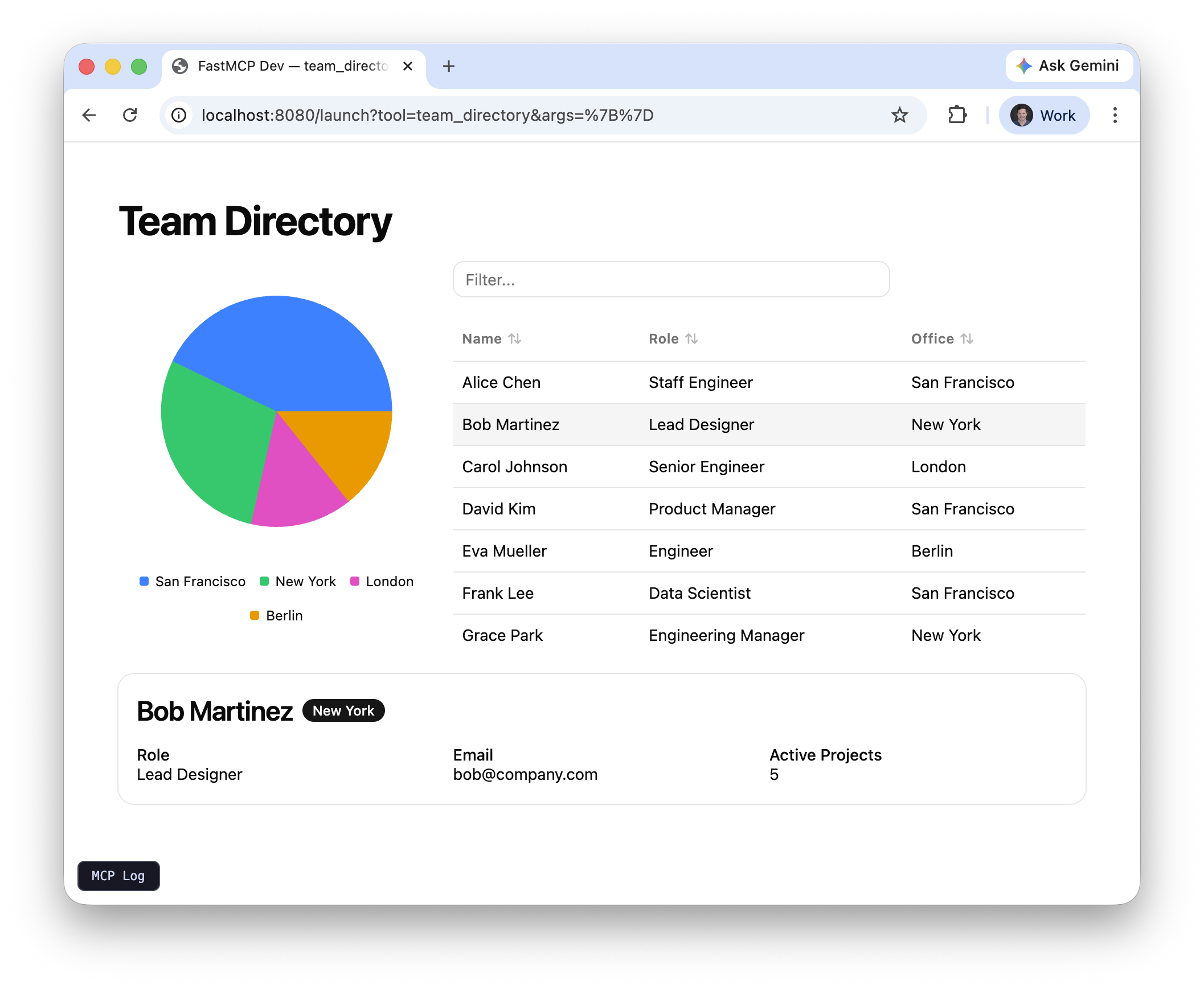 ## Make it reactive
The UI above renders once from your Python. Prefab apps can also respond to user input live, without any server round-trips. The key concept is **state**: a client-side key-value store that components read from and write to.
Click a row in the demo below to see a detail card appear:
Add a few imports, give each member a couple more fields, wire up a click handler, and render a detail card when something's selected:
```python expandable server.py theme={"theme":{"light":"snazzy-light","dark":"dark-plus"}}
from collections import Counter
from prefab_ui.actions import SetState
from prefab_ui.app import PrefabApp
from prefab_ui.components import (
Badge, Card, CardContent, CardHeader, Column, DataTable, DataTableColumn,
Grid, H3, Row, Small, Text,
)
from prefab_ui.components.charts import PieChart
from prefab_ui.components.control_flow import If
from prefab_ui.rx import Rx, STATE
from fastmcp import FastMCP
mcp = FastMCP("My First App")
MEMBERS = [
{"name": "Alice Chen", "role": "Staff Engineer", "office": "San Francisco", "email": "alice@company.com", "projects": 3},
{"name": "Bob Martinez", "role": "Lead Designer", "office": "New York", "email": "bob@company.com", "projects": 5},
# ... more members ...
]
OFFICE_COUNTS = [
{"office": o, "count": c}
for o, c in Counter(m["office"] for m in MEMBERS).items()
]
@mcp.tool(app=True)
def team_directory() -> PrefabApp:
"""Browse the team directory."""
with PrefabApp(state={"selected": None}) as app:
with Column(gap=4, css_class="p-6"):
with Grid(columns=[1, 2], gap=4):
PieChart(
data=OFFICE_COUNTS,
data_key="count",
name_key="office",
show_legend=True,
)
DataTable(
columns=[
DataTableColumn(key="name", header="Name", sortable=True),
DataTableColumn(key="role", header="Role", sortable=True),
DataTableColumn(key="office", header="Office", sortable=True),
],
rows=MEMBERS,
search=True,
on_row_click=SetState("selected", Rx("$event")),
)
with If(STATE.selected):
with Card():
with CardHeader():
with Row(gap=2, align="center"):
H3(Rx("selected.name"))
Badge(Rx("selected.office"))
with CardContent():
with Grid(columns=3, gap=4):
with Column(gap=0):
Small("Role")
Text(Rx("selected.role"))
with Column(gap=0):
Small("Email")
Text(Rx("selected.email"))
with Column(gap=0):
Small("Active Projects")
Text(Rx("selected.projects"))
return app
```
Three new ideas do all the work:
* **`on_row_click=SetState("selected", Rx("$event"))`** — clicking a row writes its data into the `selected` state key. `$event` is the clicked row dict.
* **`Rx("selected.name")`** — a reactive reference. It doesn't hold a Python value; it compiles to a browser-side expression that re-evaluates whenever `selected` changes, so `Text(Rx("selected.name"))` always shows the latest clicked name.
* **`If(STATE.selected)`** — conditionally renders its body. Before any click, `selected` is `None` and the card stays hidden.
The `state={"selected": None}` dict on `PrefabApp` sets the initial value. Everything else happens in the browser — no round-trips to your server when the user clicks.
## Where to go next
You've built a tool that returns an interactive, reactive UI. This pattern covers a huge range of use cases: build a visualization, return it, and the user gets it rendered right in the conversation.
* **[Interactive Tools](/apps/prefab)** — charts, tables, dashboards, reactive state, with live demos
* **[FastMCPApp](/apps/fastmcp-app)** — when the UI needs to call back to your server (forms, search, CRUD)
* **[Examples](/apps/examples)** — complete working servers you can run today
## Make it reactive
The UI above renders once from your Python. Prefab apps can also respond to user input live, without any server round-trips. The key concept is **state**: a client-side key-value store that components read from and write to.
Click a row in the demo below to see a detail card appear:
Add a few imports, give each member a couple more fields, wire up a click handler, and render a detail card when something's selected:
```python expandable server.py theme={"theme":{"light":"snazzy-light","dark":"dark-plus"}}
from collections import Counter
from prefab_ui.actions import SetState
from prefab_ui.app import PrefabApp
from prefab_ui.components import (
Badge, Card, CardContent, CardHeader, Column, DataTable, DataTableColumn,
Grid, H3, Row, Small, Text,
)
from prefab_ui.components.charts import PieChart
from prefab_ui.components.control_flow import If
from prefab_ui.rx import Rx, STATE
from fastmcp import FastMCP
mcp = FastMCP("My First App")
MEMBERS = [
{"name": "Alice Chen", "role": "Staff Engineer", "office": "San Francisco", "email": "alice@company.com", "projects": 3},
{"name": "Bob Martinez", "role": "Lead Designer", "office": "New York", "email": "bob@company.com", "projects": 5},
# ... more members ...
]
OFFICE_COUNTS = [
{"office": o, "count": c}
for o, c in Counter(m["office"] for m in MEMBERS).items()
]
@mcp.tool(app=True)
def team_directory() -> PrefabApp:
"""Browse the team directory."""
with PrefabApp(state={"selected": None}) as app:
with Column(gap=4, css_class="p-6"):
with Grid(columns=[1, 2], gap=4):
PieChart(
data=OFFICE_COUNTS,
data_key="count",
name_key="office",
show_legend=True,
)
DataTable(
columns=[
DataTableColumn(key="name", header="Name", sortable=True),
DataTableColumn(key="role", header="Role", sortable=True),
DataTableColumn(key="office", header="Office", sortable=True),
],
rows=MEMBERS,
search=True,
on_row_click=SetState("selected", Rx("$event")),
)
with If(STATE.selected):
with Card():
with CardHeader():
with Row(gap=2, align="center"):
H3(Rx("selected.name"))
Badge(Rx("selected.office"))
with CardContent():
with Grid(columns=3, gap=4):
with Column(gap=0):
Small("Role")
Text(Rx("selected.role"))
with Column(gap=0):
Small("Email")
Text(Rx("selected.email"))
with Column(gap=0):
Small("Active Projects")
Text(Rx("selected.projects"))
return app
```
Three new ideas do all the work:
* **`on_row_click=SetState("selected", Rx("$event"))`** — clicking a row writes its data into the `selected` state key. `$event` is the clicked row dict.
* **`Rx("selected.name")`** — a reactive reference. It doesn't hold a Python value; it compiles to a browser-side expression that re-evaluates whenever `selected` changes, so `Text(Rx("selected.name"))` always shows the latest clicked name.
* **`If(STATE.selected)`** — conditionally renders its body. Before any click, `selected` is `None` and the card stays hidden.
The `state={"selected": None}` dict on `PrefabApp` sets the initial value. Everything else happens in the browser — no round-trips to your server when the user clicks.
## Where to go next
You've built a tool that returns an interactive, reactive UI. This pattern covers a huge range of use cases: build a visualization, return it, and the user gets it rendered right in the conversation.
* **[Interactive Tools](/apps/prefab)** — charts, tables, dashboards, reactive state, with live demos
* **[FastMCPApp](/apps/fastmcp-app)** — when the UI needs to call back to your server (forms, search, CRUD)
* **[Examples](/apps/examples)** — complete working servers you can run today