> ## Documentation Index
> Fetch the complete documentation index at: https://gofastmcp.com/llms.txt
> Use this file to discover all available pages before exploring further.
# File Upload
> Drag-and-drop file upload for any MCP server
export const VersionBadge = ({version}) => {
return
New in version {version}
;
};
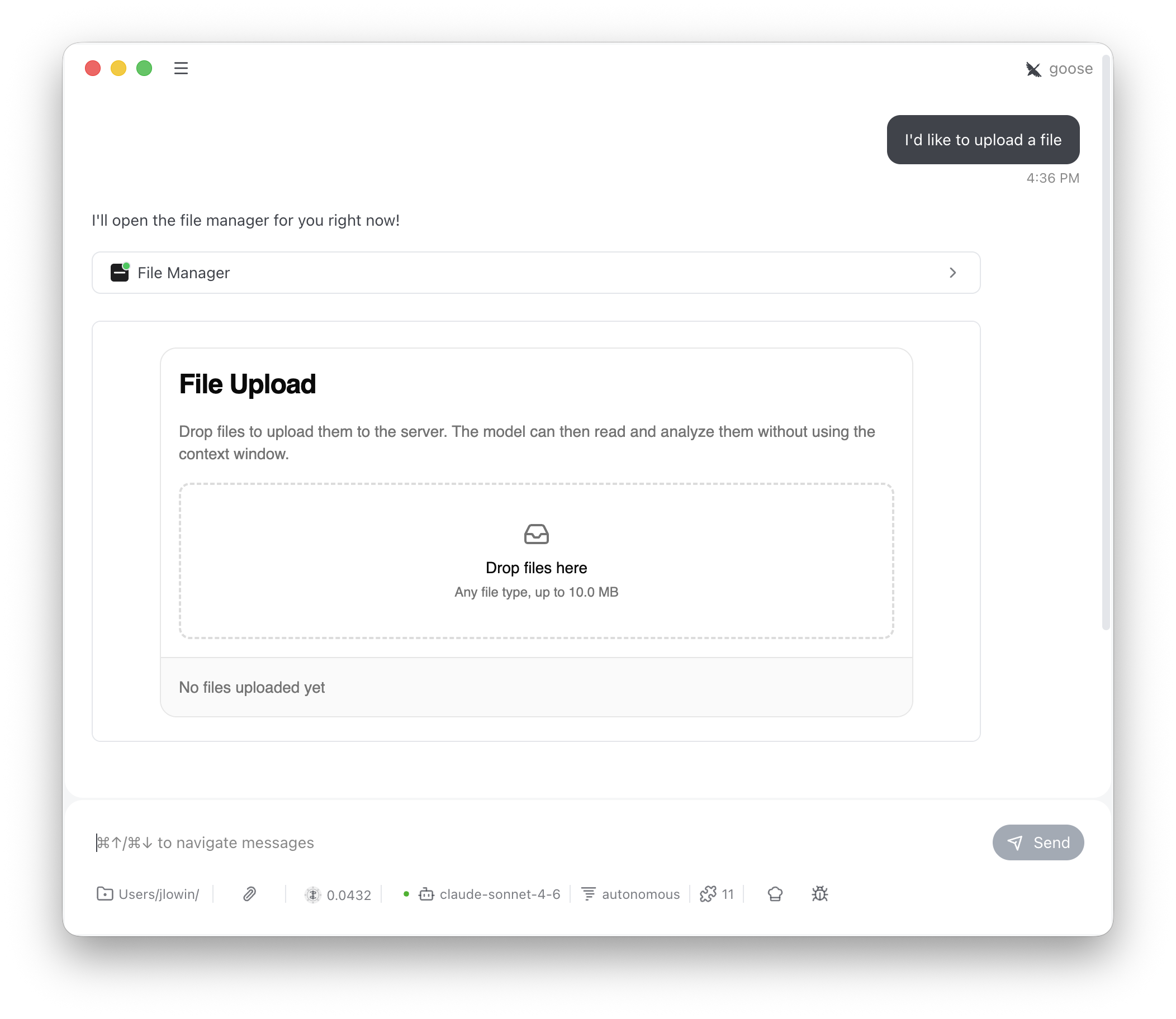
`FileUpload` adds drag-and-drop file upload to any server. Users upload files through an interactive UI, bypassing the LLM context window entirely. The LLM can then list and read uploaded files through model-visible tools.
 ```python theme={"theme":{"light":"snazzy-light","dark":"dark-plus"}}
from fastmcp import FastMCP
from fastmcp.apps.file_upload import FileUpload
mcp = FastMCP("My Server")
mcp.add_provider(FileUpload())
```
This registers four tools:
| Tool | Visibility | Purpose |
| -------------- | ---------- | -------------------------------------------- |
| `file_manager` | Model | Opens the drag-and-drop upload UI |
| `store_files` | App only | Called by the UI when the user clicks Upload |
| `list_files` | Model | Returns metadata for all uploaded files |
| `read_file` | Model | Returns a file's contents by name |
The LLM sees `file_manager`, `list_files`, and `read_file`. It calls `file_manager` to show the upload interface, then uses `list_files` and `read_file` to work with whatever the user uploaded. `store_files` is app-only — the UI calls it directly and the LLM never needs to know about it.
## Configuration
```python theme={"theme":{"light":"snazzy-light","dark":"dark-plus"}}
FileUpload(
name="Files", # App name (used in tool routing)
max_file_size=10 * 1024 * 1024, # 10 MB default, enforced server-side
title="File Upload", # Heading shown in the UI
description="Drop files to...", # Description text below the heading
drop_label="Drop files here", # Label inside the drop zone
)
```
The `max_file_size` limit is enforced both in the UI (the DropZone rejects oversized files) and on the server (the `store_files` tool validates before calling `on_store`).
## Storage scoping
By default, files are stored in memory and scoped by MCP session ID. Each session gets its own isolated file store — files uploaded in one conversation aren't visible in another.
This works with **stdio**, **SSE**, and **stateful HTTP** transports, where sessions persist across requests.
In **stateless HTTP** mode, each request creates a new session object with a new ID. Files stored during one request (e.g. the UI upload) will be invisible to the next request (e.g. the LLM calling `list_files`). You **must** override `_get_scope_key` to use a stable identifier like a user ID from your auth token.
For stateless deployments, override `_get_scope_key` to return a stable identifier. For example, to scope files by authenticated user:
```python theme={"theme":{"light":"snazzy-light","dark":"dark-plus"}}
from fastmcp.apps.file_upload import FileUpload
class UserScopedUpload(FileUpload):
def _get_scope_key(self, ctx):
return ctx.access_token["sub"]
```
For process-wide shared storage (all users see all files):
```python theme={"theme":{"light":"snazzy-light","dark":"dark-plus"}}
class SharedUpload(FileUpload):
def _get_scope_key(self, ctx):
return "__shared__"
```
## Custom storage
The default implementation stores files in memory for the lifetime of the server process. For persistent storage, subclass `FileUpload` and override three methods. Each receives the current `Context`, giving you access to session IDs, auth tokens, and request metadata for partitioning and authorization.
```python theme={"theme":{"light":"snazzy-light","dark":"dark-plus"}}
import base64
from fastmcp.apps.file_upload import FileUpload
class S3Upload(FileUpload):
def on_store(self, files, ctx):
user_id = ctx.access_token["sub"]
for f in files:
s3.put_object(
Bucket="uploads",
Key=f"{user_id}/{f['name']}",
Body=base64.b64decode(f["data"]),
)
return self.on_list(ctx)
def on_list(self, ctx):
user_id = ctx.access_token["sub"]
objects = s3.list_objects(Bucket="uploads", Prefix=f"{user_id}/")
return [
{
"name": obj["Key"].split("/", 1)[1],
"type": "application/octet-stream",
"size": obj["Size"],
"size_display": f"{obj['Size']} B",
"uploaded_at": obj["LastModified"].isoformat(),
}
for obj in objects.get("Contents", [])
]
def on_read(self, name, ctx):
user_id = ctx.access_token["sub"]
obj = s3.get_object(Bucket="uploads", Key=f"{user_id}/{name}")
content = obj["Body"].read()
return {
"name": name,
"size": obj["ContentLength"],
"type": obj["ContentType"],
"uploaded_at": obj["LastModified"].isoformat(),
"content": content.decode("utf-8"),
}
```
Each file dict passed to `on_store` contains `name`, `size`, `type`, and `data` (base64-encoded content). The return value from `on_store` and `on_list` should be a list of summary dicts with `name`, `type`, `size`, `size_display`, and `uploaded_at` fields — these populate the file list in the UI.
`on_read` returns a dict with file metadata and either `content` (decoded text) or `content_base64` (a base64 preview for binary files).
```python theme={"theme":{"light":"snazzy-light","dark":"dark-plus"}}
from fastmcp import FastMCP
from fastmcp.apps.file_upload import FileUpload
mcp = FastMCP("My Server")
mcp.add_provider(FileUpload())
```
This registers four tools:
| Tool | Visibility | Purpose |
| -------------- | ---------- | -------------------------------------------- |
| `file_manager` | Model | Opens the drag-and-drop upload UI |
| `store_files` | App only | Called by the UI when the user clicks Upload |
| `list_files` | Model | Returns metadata for all uploaded files |
| `read_file` | Model | Returns a file's contents by name |
The LLM sees `file_manager`, `list_files`, and `read_file`. It calls `file_manager` to show the upload interface, then uses `list_files` and `read_file` to work with whatever the user uploaded. `store_files` is app-only — the UI calls it directly and the LLM never needs to know about it.
## Configuration
```python theme={"theme":{"light":"snazzy-light","dark":"dark-plus"}}
FileUpload(
name="Files", # App name (used in tool routing)
max_file_size=10 * 1024 * 1024, # 10 MB default, enforced server-side
title="File Upload", # Heading shown in the UI
description="Drop files to...", # Description text below the heading
drop_label="Drop files here", # Label inside the drop zone
)
```
The `max_file_size` limit is enforced both in the UI (the DropZone rejects oversized files) and on the server (the `store_files` tool validates before calling `on_store`).
## Storage scoping
By default, files are stored in memory and scoped by MCP session ID. Each session gets its own isolated file store — files uploaded in one conversation aren't visible in another.
This works with **stdio**, **SSE**, and **stateful HTTP** transports, where sessions persist across requests.
In **stateless HTTP** mode, each request creates a new session object with a new ID. Files stored during one request (e.g. the UI upload) will be invisible to the next request (e.g. the LLM calling `list_files`). You **must** override `_get_scope_key` to use a stable identifier like a user ID from your auth token.
For stateless deployments, override `_get_scope_key` to return a stable identifier. For example, to scope files by authenticated user:
```python theme={"theme":{"light":"snazzy-light","dark":"dark-plus"}}
from fastmcp.apps.file_upload import FileUpload
class UserScopedUpload(FileUpload):
def _get_scope_key(self, ctx):
return ctx.access_token["sub"]
```
For process-wide shared storage (all users see all files):
```python theme={"theme":{"light":"snazzy-light","dark":"dark-plus"}}
class SharedUpload(FileUpload):
def _get_scope_key(self, ctx):
return "__shared__"
```
## Custom storage
The default implementation stores files in memory for the lifetime of the server process. For persistent storage, subclass `FileUpload` and override three methods. Each receives the current `Context`, giving you access to session IDs, auth tokens, and request metadata for partitioning and authorization.
```python theme={"theme":{"light":"snazzy-light","dark":"dark-plus"}}
import base64
from fastmcp.apps.file_upload import FileUpload
class S3Upload(FileUpload):
def on_store(self, files, ctx):
user_id = ctx.access_token["sub"]
for f in files:
s3.put_object(
Bucket="uploads",
Key=f"{user_id}/{f['name']}",
Body=base64.b64decode(f["data"]),
)
return self.on_list(ctx)
def on_list(self, ctx):
user_id = ctx.access_token["sub"]
objects = s3.list_objects(Bucket="uploads", Prefix=f"{user_id}/")
return [
{
"name": obj["Key"].split("/", 1)[1],
"type": "application/octet-stream",
"size": obj["Size"],
"size_display": f"{obj['Size']} B",
"uploaded_at": obj["LastModified"].isoformat(),
}
for obj in objects.get("Contents", [])
]
def on_read(self, name, ctx):
user_id = ctx.access_token["sub"]
obj = s3.get_object(Bucket="uploads", Key=f"{user_id}/{name}")
content = obj["Body"].read()
return {
"name": name,
"size": obj["ContentLength"],
"type": obj["ContentType"],
"uploaded_at": obj["LastModified"].isoformat(),
"content": content.decode("utf-8"),
}
```
Each file dict passed to `on_store` contains `name`, `size`, `type`, and `data` (base64-encoded content). The return value from `on_store` and `on_list` should be a list of summary dicts with `name`, `type`, `size`, `size_display`, and `uploaded_at` fields — these populate the file list in the UI.
`on_read` returns a dict with file metadata and either `content` (decoded text) or `content_base64` (a base64 preview for binary files).