> ## Documentation Index
> Fetch the complete documentation index at: https://gofastmcp.com/llms.txt
> Use this file to discover all available pages before exploring further.
# Choice
> Present clickable options instead of free-text responses
export const VersionBadge = ({version}) => {
return
New in version {version}
;
};
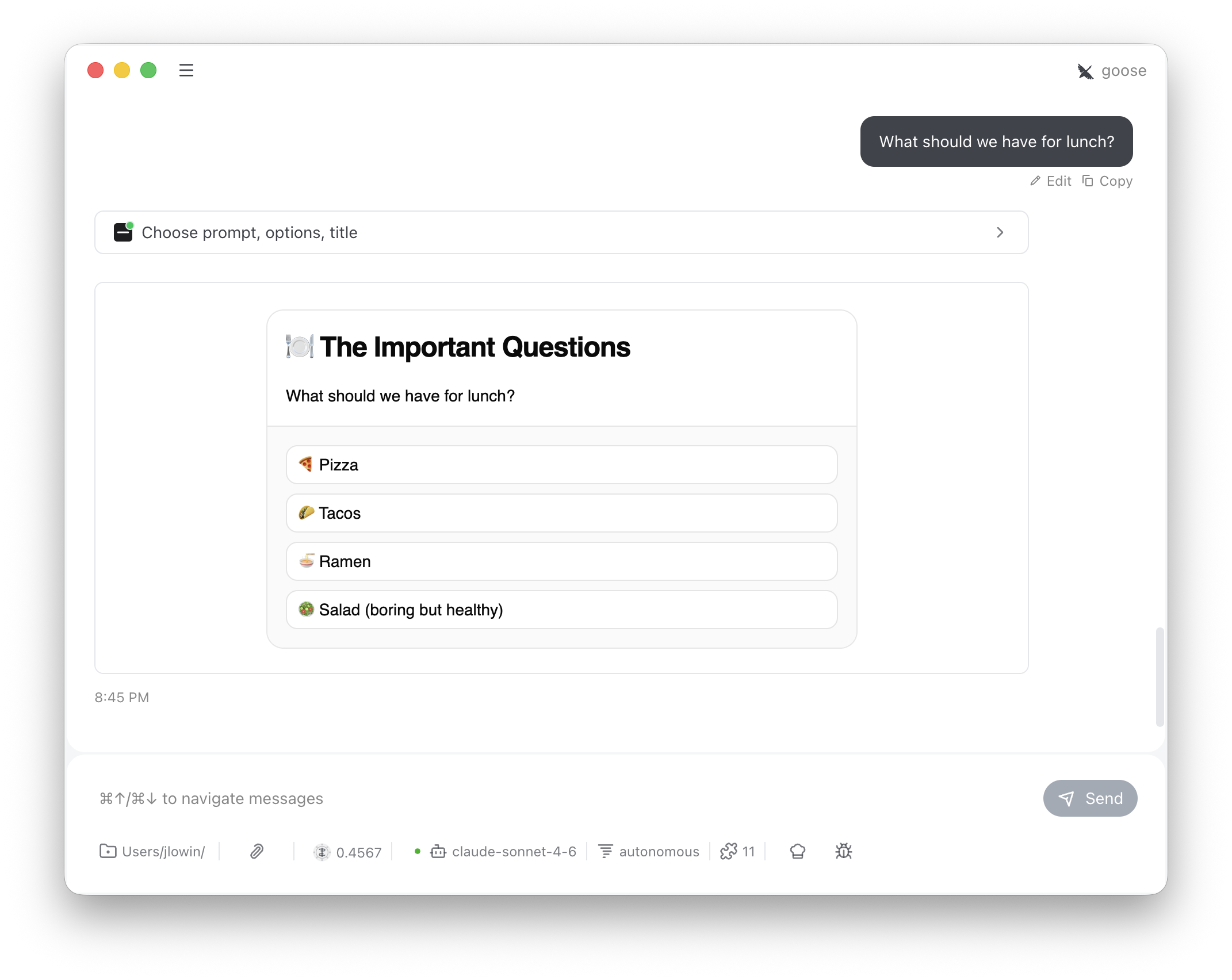
`Choice` lets the LLM present a set of options as clickable buttons instead of asking the user to type a response. The selection flows back into the conversation as a message, giving the LLM clean structured input.
 ```python theme={"theme":{"light":"snazzy-light","dark":"dark-plus"}}
from fastmcp import FastMCP
from fastmcp.apps.choice import Choice
mcp = FastMCP("My Server")
mcp.add_provider(Choice())
```
This registers a single tool:
| Tool | Visibility | Purpose |
| -------- | ---------- | -------------------------------------------------------------------------- |
| `choose` | Model | Shows a card with clickable options, sends the selection back as a message |
The LLM calls `choose` with a prompt and a list of options. The user sees a card with one button per option. Clicking one sends a message back into the conversation:
```
"Which deployment strategy?" — I selected: Blue-green
```
This is an advisory interaction, not an enforcement mechanism. The conversation isn't blocked while the card is open — the user can keep typing, and the LLM could proceed without waiting. The tool description instructs the LLM to stop and wait for the "I selected:" response, but for hard enforcement, implement selection logic server-side.
## Configuration
The constructor sets defaults; the LLM can override `title` per-call.
```python theme={"theme":{"light":"snazzy-light","dark":"dark-plus"}}
Choice(
name="Choice", # App name
title="Choose an Option", # Default card heading
variant="outline", # Button style for all options
)
```
The LLM provides the options per-call:
```python theme={"theme":{"light":"snazzy-light","dark":"dark-plus"}}
choose(
prompt="What should we have for lunch?",
options=["Pizza", "Tacos", "Ramen", "Salad"],
title="The Important Questions",
)
```
## How it works
Each option renders as a full-width button in a vertical stack. When the user clicks one:
1. `SendMessage` pushes the selection into the conversation as a user message
2. `SetState("decided", True)` replaces the buttons with "Response sent."
The tool description instructs the LLM to stop and wait for the "I selected:" message before proceeding with whatever the user chose.
```python theme={"theme":{"light":"snazzy-light","dark":"dark-plus"}}
from fastmcp import FastMCP
from fastmcp.apps.choice import Choice
mcp = FastMCP("My Server")
mcp.add_provider(Choice())
```
This registers a single tool:
| Tool | Visibility | Purpose |
| -------- | ---------- | -------------------------------------------------------------------------- |
| `choose` | Model | Shows a card with clickable options, sends the selection back as a message |
The LLM calls `choose` with a prompt and a list of options. The user sees a card with one button per option. Clicking one sends a message back into the conversation:
```
"Which deployment strategy?" — I selected: Blue-green
```
This is an advisory interaction, not an enforcement mechanism. The conversation isn't blocked while the card is open — the user can keep typing, and the LLM could proceed without waiting. The tool description instructs the LLM to stop and wait for the "I selected:" response, but for hard enforcement, implement selection logic server-side.
## Configuration
The constructor sets defaults; the LLM can override `title` per-call.
```python theme={"theme":{"light":"snazzy-light","dark":"dark-plus"}}
Choice(
name="Choice", # App name
title="Choose an Option", # Default card heading
variant="outline", # Button style for all options
)
```
The LLM provides the options per-call:
```python theme={"theme":{"light":"snazzy-light","dark":"dark-plus"}}
choose(
prompt="What should we have for lunch?",
options=["Pizza", "Tacos", "Ramen", "Salad"],
title="The Important Questions",
)
```
## How it works
Each option renders as a full-width button in a vertical stack. When the user clicks one:
1. `SendMessage` pushes the selection into the conversation as a user message
2. `SetState("decided", True)` replaces the buttons with "Response sent."
The tool description instructs the LLM to stop and wait for the "I selected:" message before proceeding with whatever the user chose.